

Bambu Lab releases BambuStudio update with Color Mixing feature!
RECODE.AM #46


Yesterday, Bambu Lab announced the launch of the X2D - the second generation of its flagship X series. The printer introduces a dual-nozzle extrusion system with mechanical switching, active thermal chamber management with heating up to 65°C, and dynamic flow calibration performed automatically before each print.
So far, reactions from media, KOLs, and regular users have been overwhelmingly enthusiastic. Maybe it’s the brand, maybe the technical specifications, maybe the price… I don’t know. But one thing is certain: the X2D is a big deal.
At the same time, somewhat quietly, Bambu Lab released an update to BambuStudio, bringing it to version 2.5.3. While the main purpose of the update is to support the X2D, the software also received several additional features worth mentioning.
The biggest addition is Color Mixing - the ability to mix colors directly in the slicer, without any external tools or complicated workarounds.
The concept is simple: at the bottom of the filament list, a new button appears - “Add Mixed Filament” - which opens a configuration window. There, you select two or three filaments of the same type and define the proportions in which they should be mixed.
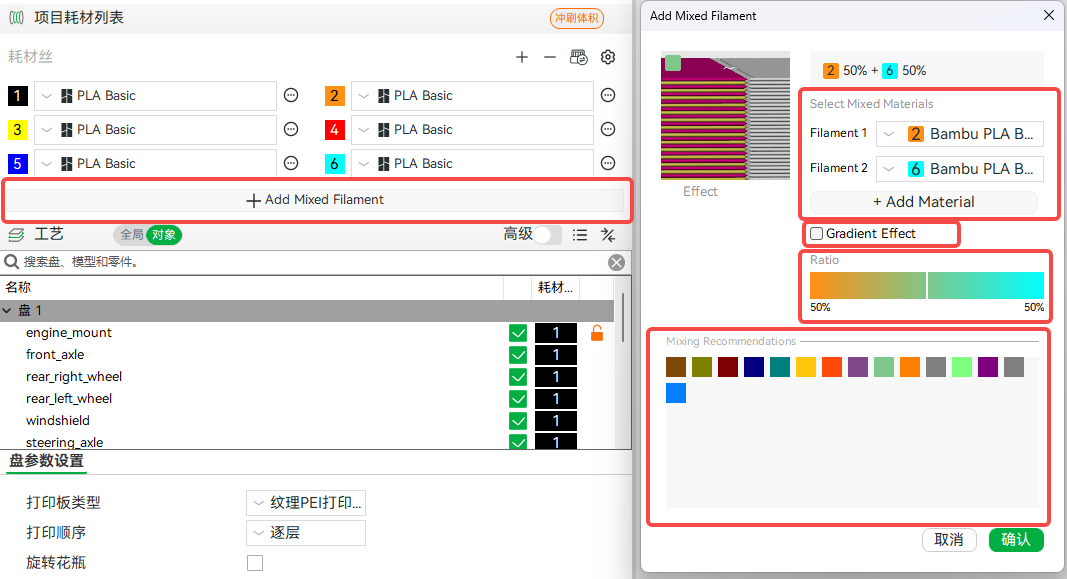
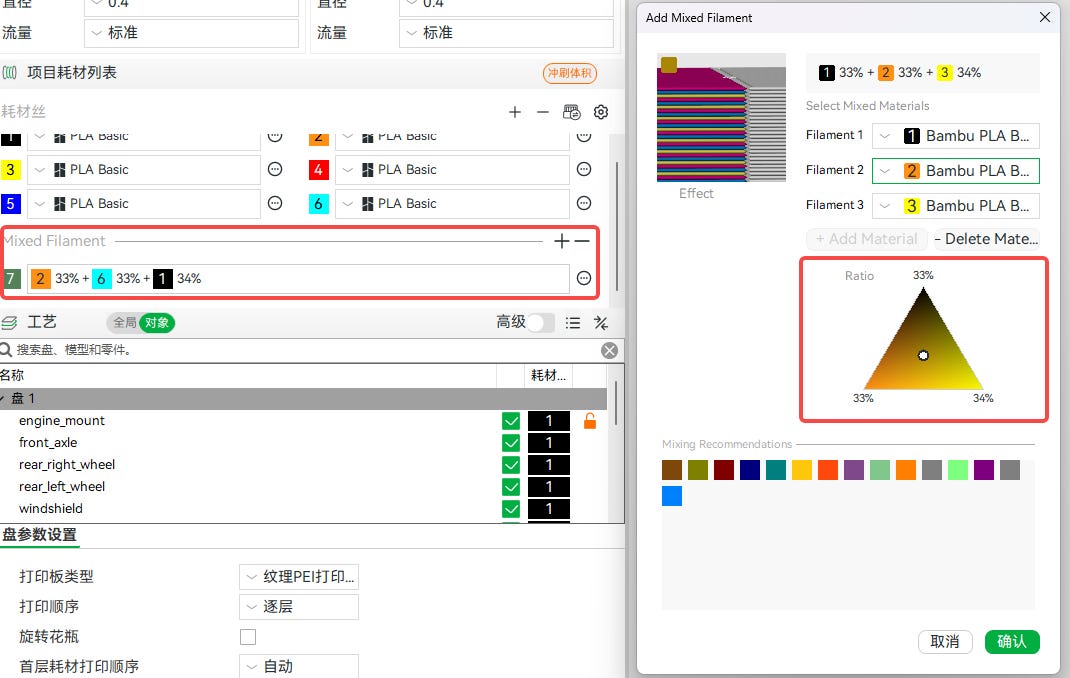
Color Mixing offers two operating modes. The first is Normal mode, where the user sets color proportions using a color bar (for two filaments) or a color triangle (for three). You can also click directly on one of the recommended colors.
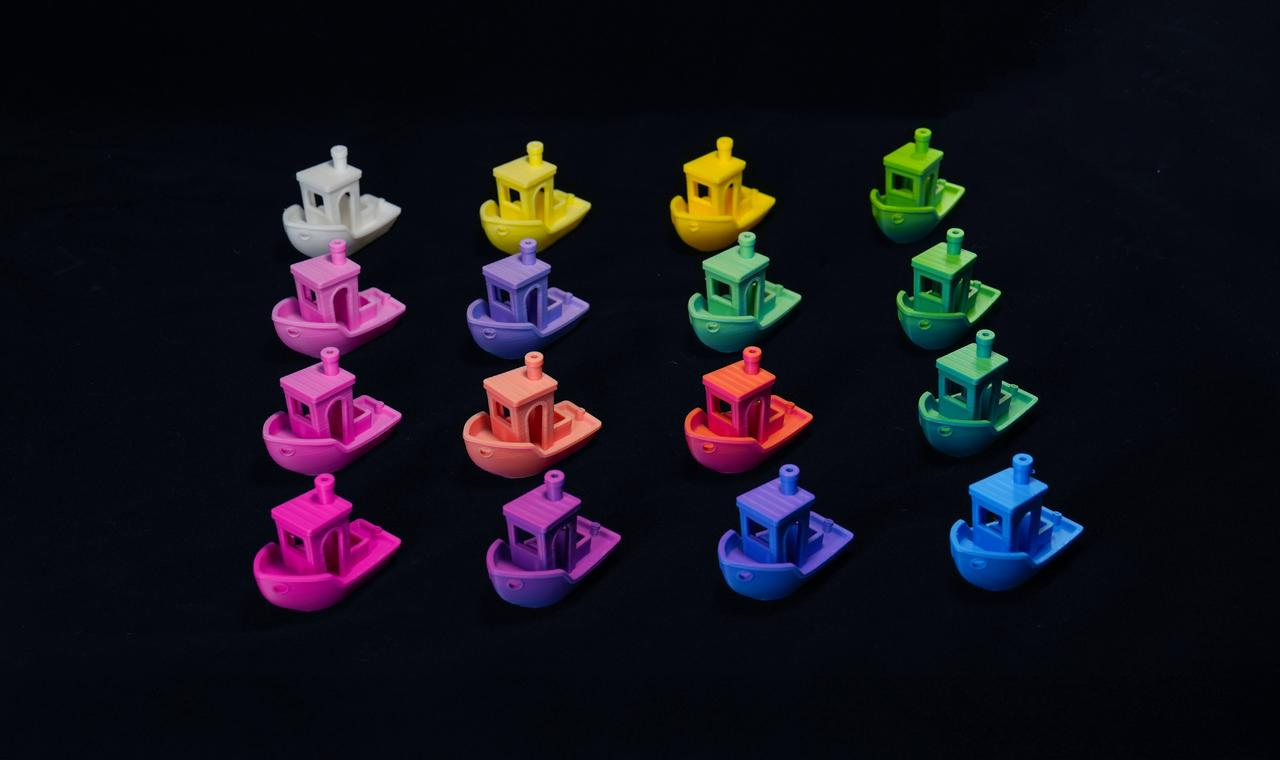
Bambu Lab promotes this feature alongside its CMYK filament set - and indeed, using four base colors, it is possible to achieve a very wide range of shades.
The second mode is Gradient - instead of a uniform mixed color, the transition between two colors is gradually distributed along the height of the model.
The result is exactly what you would expect: a smooth, multi-layer color transition that previously required manual layer-by-layer color assignment or external scripts.
There are, however, important caveats that Bambu Lab openly acknowledges.
Color Mixing works best on near-vertical walls - on sloped surfaces and top or bottom layers, the effect can be unpredictable.
Single-nozzle printers technically support the feature, but frequent color changes and high filament consumption during purging make it an expensive option.
The full potential of Color Mixing is unlocked on multi-nozzle printers - such as the newly introduced X2D or H2C. With a 0.4 mm nozzle, a base layer height of 0.12 mm and a mixed layer height of 0.2 mm are recommended - values that are too low may cause melt instability and degrade print quality.
Color preview in the slicer is not yet fully accurate, so Bambu Lab recommends printing a test sample before committing to a full print.
In addition to Color Mixing, the update introduces support for Filament Track Switch - a mechanism that allows filament from the AMS to be routed to both nozzles in multi-extruder printers (H2C and X2D). In practice, this means a single filament can be printed through different nozzles depending on slicer needs, reducing unnecessary purging and significantly improving multi-color printing efficiency.
Another addition is Linear Fan Speed Transition - the cooling and auxiliary fan speeds now change gradually, layer by layer, instead of switching abruptly. It’s a subtle change, but important for first layers, where sudden cooling can lead to warping or poor bed adhesion.
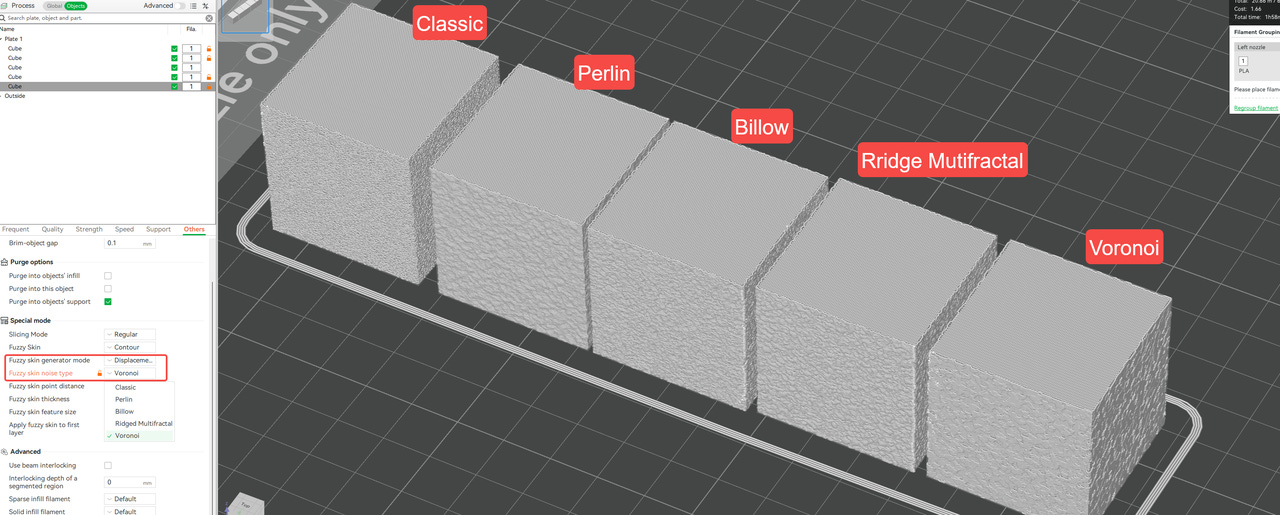
Fuzzy Skin has also been expanded, which will please users who like textured surfaces. In addition to the classic mode, four new noise types are now available: Perlin, Billow, Ridged Multifractal, and Voronoi. New generator modes have also been added - Displacement (sideways nozzle movement relative to the path), Extrusion (variation in material flow along a straight path), and Combined (a mix of both).
A separate note should be made of one small but meaningful change for H2C printers. Bambu Studio 2.5.3 now displays cumulative print time for the H2C nozzle. This means the nozzle information panel shows total usage time - not just the current print, but the entire lifetime.
For users who operate H2C machines intensively and want better control over hardware wear, this is a practical and valuable addition.

BambuStudio 2.5.3 is now available for download on macOS and Windows. The Linux version, however, is not yet ready.
Read all: wiki.bambulab.com