

You write a sentence - CAD does the work. You can now control FreeCAD through Claude and ChatGPT!
Tell Claude to design a part, and FreeCAD will build it

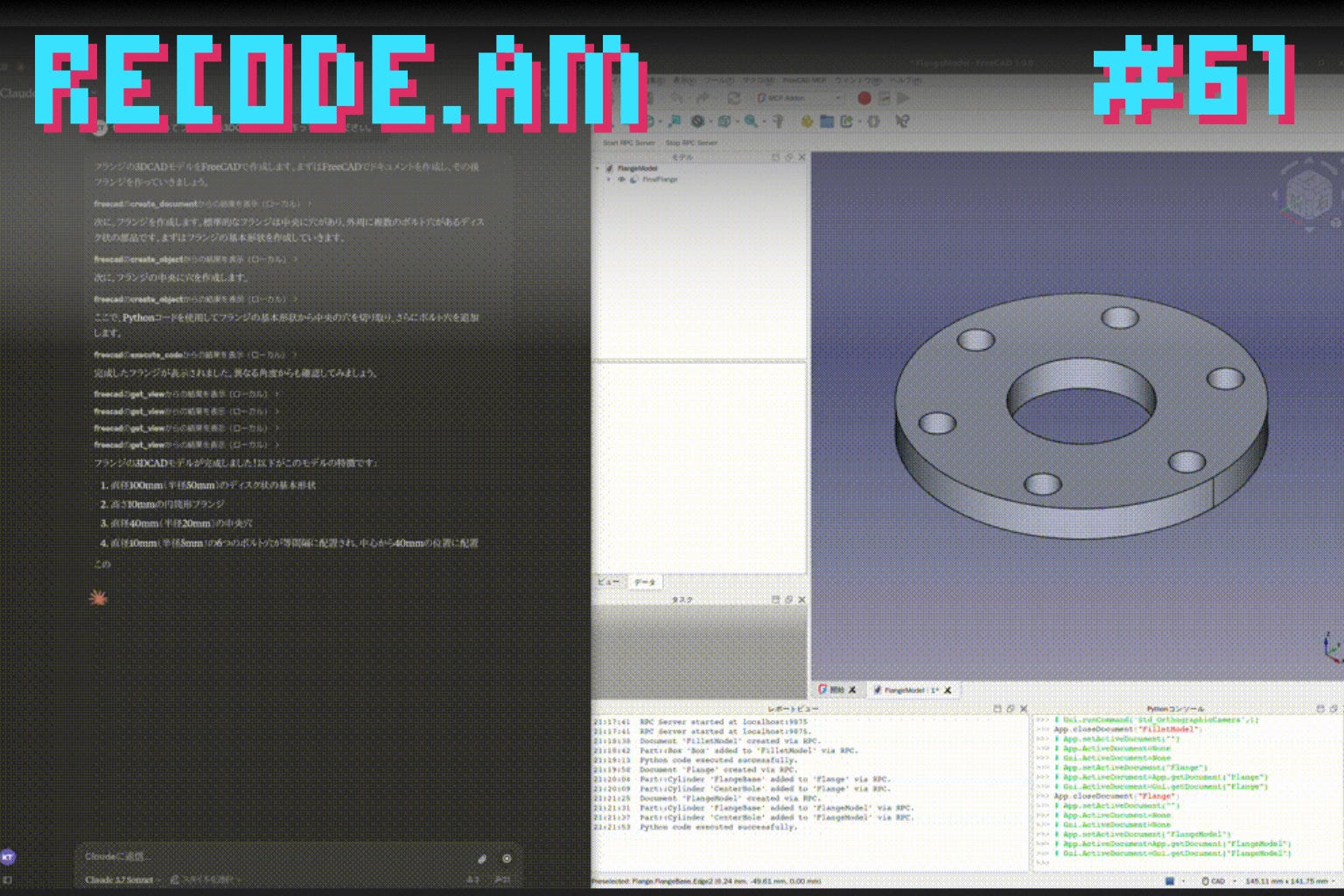
Something that would have sounded like yet another overhyped startup pitch destined to go bankrupt, has now become reality: you can control FreeCAD directly from Claude. You open a chat, describe what you want to create, and the software builds it.
It’s called FreeCAD MCP, created by GitHub user neka-nat. And yes - it actually works.
MCP stands for Model Context Protocol: a standardized way for AI to communicate with external applications. Think of it as a common language that lets a model issue commands to software.
There are countless MCP bridges appearing these days. One of the newest connects directly to FreeCAD.
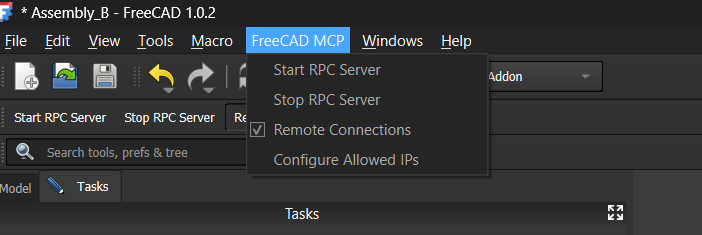
Installation is surprisingly simple. Copy a folder into the /Mod directory, restart FreeCAD, and a new workbench called MCP appears in the interface. One click enables it, another starts the RPC server. Claude immediately recognizes the application and lists everything it can do.
And that’s where things get interesting, because the list includes much more than just “create an object.” It can also launch finite element simulations. I’ll come back to that, because it’s easily the strongest feature of the entire project.
But before anyone declares that CAD designers are no longer needed - hold on!
For simple parts, it works remarkably well. For complex designs, you still need someone who actually knows FreeCAD and can step in when the AI gets lost.
Still, the direction is unmistakable. The barrier to entry for CAD has just become significantly lower.
So how do you get it running?
FreeCAD is a free, open-source CAD package. It has always been incredibly powerful, and unfortunately, notoriously unfriendly to beginners.
Everything is built around MCP (Model Context Protocol). It’s a standard that gives AI a predefined “grammar” for interacting with software. The model knows which commands exist and how to call them. FreeCAD gains this capability through an add-on created by GitHub user neka-nat.
To get everything working, you need to:
Copy the addon/FreeCADMCP folder into the /Mod directory (the exact location depends on your operating system).
Restart FreeCAD.
Select the MCP Addon workbench.
Click Start RPC Server in the toolbar. You can also enable Auto-Start Server, which stores the setting in freecad_mcp_settings.json and automatically starts the server whenever FreeCAD launches.
On the Claude Desktop side, you’ll first need to install uvx and make a single change to the claude_desktop_config.json file.
That’s it.
After restarting Claude, it detects FreeCAD automatically and lists all available commands. And there are plenty of them.
It can create and edit documents and objects, delete them, insert parts from libraries, capture screenshots of the active viewport, inspect the scene, and much more. It can also execute arbitrary Python code inside FreeCAD - which, in practice, means the ceiling is as high as FreeCAD itself.
I saved the best part for last…
The command is called run_fem_analysis.
It launches the CalculiX solver on an existing finite element analysis and returns actual engineering results: maximum von Mises stress, maximum displacement, and the number of mesh nodes.
If the analysis doesn’t already include a solver, the add-on inserts one automatically. Which means the AI doesn’t just draw geometry, but it can actually verify whether that geometry is likely to survive the intended load.
Geometry plus an initial structural verification - all from a single chat window!
Not long ago, this required two separate applications and half a day of clicking.
So how well does it actually work?
Early public tests reveal a clear pattern. Simple geometries are almost instantaneous.
A cube? No problem.
A shelf or a simple mounting bracket? Also easy.
Things become more challenging as complexity increases. The AI may omit details - holes that were supposed to be there simply disappear, or invent features that nobody asked for.
The good news is that it improves when you point out the mistakes.
The catch is that someone still has to recognize those mistakes in the first place, and ideally that person knows FreeCAD.
Which brings me to conclusion:
For beginners, this could become the easiest way to get into CAD in years. For professionals, it’s an assistant that takes care of the repetitive work while you focus on making sure the part actually works.
Why would anyone want CAD controlled with plain English? Because we’re watching the design interface evolve into natural language.
A simple sentence typed into a chat window can now accomplish what used to require a mouse, dozens of toolbars, and layers of menus.
I’ve been saying this for years: in additive manufacturing, hardware alone is no longer enough. Competitive advantage is shifting toward software.
FreeCAD MCP is a small but tangible example of exactly that. Nothing about FreeCAD itself had to change. The innovation lives entirely in a software layer added on top of an existing application.
And thanks to that layer, a mature and incredibly capable CAD package suddenly becomes accessible to people who’ve never touched a sketching tool before.
P.S. This isn’t limited to Claude. You can connect the same MCP server to ChatGPT (via Codex) as well. Kerry Stevenson from Fabbaloo did exactly that and documented the results. It’s well worth reading.
Let's take this a step further: I assign my agent network the task of improving my product, and they go ahead and use FreeCAD to customize the necessary parts, save them in the correct format, and immediately order the finished part from Xometry!
That's the missing key to agent-driven additive manufacturing, isn't it?